# Agentic Computer Use: How AI Learned to See Screens and Click Buttons
Between October 2024 and April 2026, AI models went from not being able to use a computer to outperforming humans on the canonical desktop benchmark. The core idea is almost stupidly simple: a vision-language model looks at a screenshot, figures out where to click, clicks, looks at the new screenshot, and repeats. Every major lab ships this now.
This post is the technical origin story. How it works, how it got built, and why it's harder than it sounds.
The loop
Here's what actually happens when you call a computer-use API.
You send a screenshot (a PNG image, encoded as base64 so it can travel inside a JSON call) to a model like Claude. The model sends back a JSON blob telling you what to do:
{
  "type": "tool_use",
  "name": "computer",
  "input": {
    "action": "left_click",
    "coordinate": [342, 87]
  }
}
You execute that click on a desktop environment (usually a Linux VM faking a display with a tool called Xvfb), grab a new screenshot, and send it back. The model looks at the result, thinks about the next step, spits out another action. Screenshot in, action out, screenshot in, action out. Until the task is done or you pull the plug.
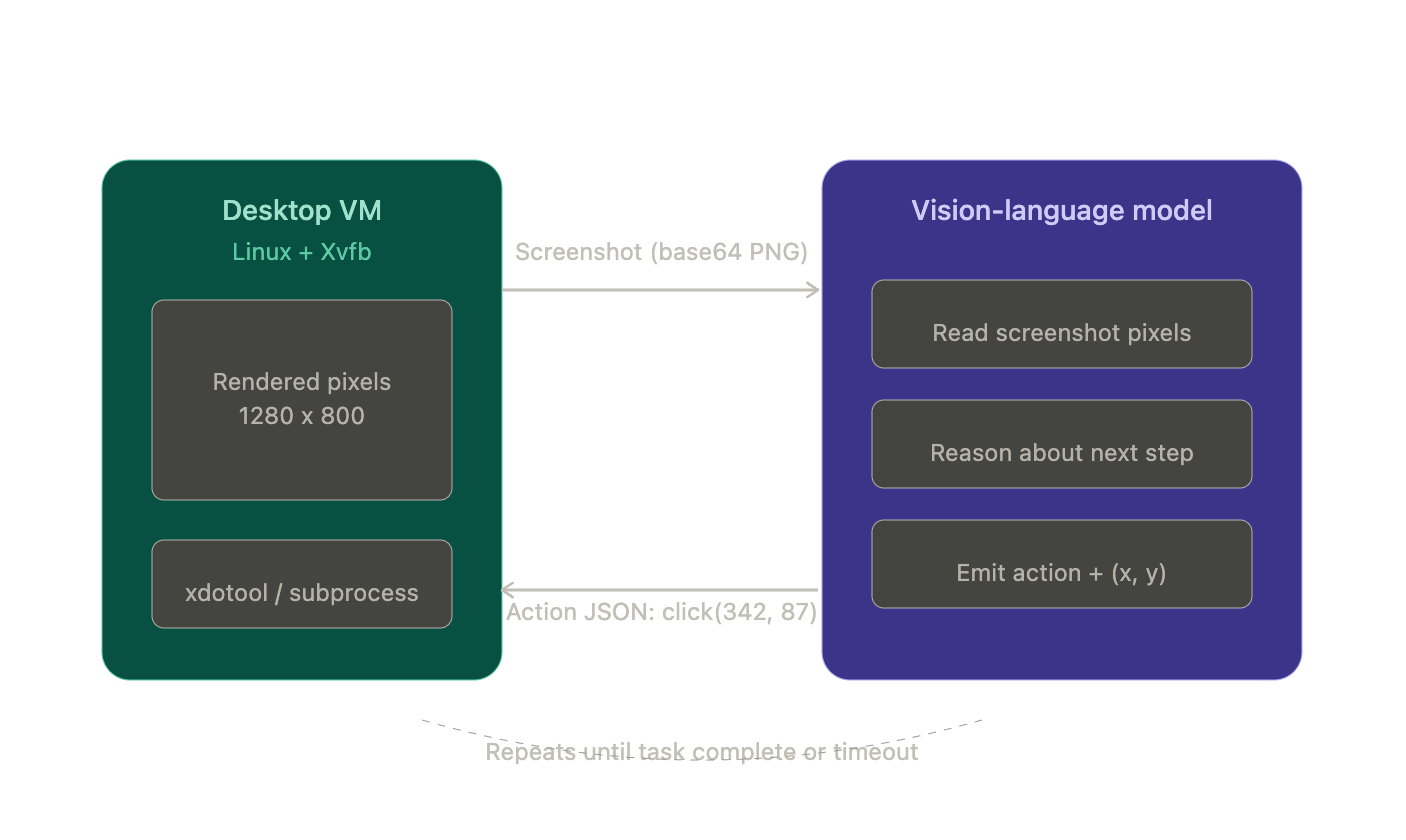 There's no DOM (the structured tree of HTML elements developers use to find things on a page). No accessibility tree. No element IDs. The model is staring at raw pixels and counting distances from screen edges. This coordinate prediction isn't prompt-engineered. It's baked into the model weights through training on massive GUI interaction datasets.
That's the whole thing. Everything else (the product wrappers, the benchmarks, the $380 billion valuations) sits on top of this loop.
Why not just use macros?
RPA (Robotic Process Automation) is basically macro recording for business software. Tools like UiPath let you record clicks and keystrokes, then replay them. They find buttons by looking up selectors in the page structure: a CSS class, an accessibility ID, a path through the UI tree. It's fast and deterministic. But when a developer renames a CSS class or moves a button, the bot breaks.
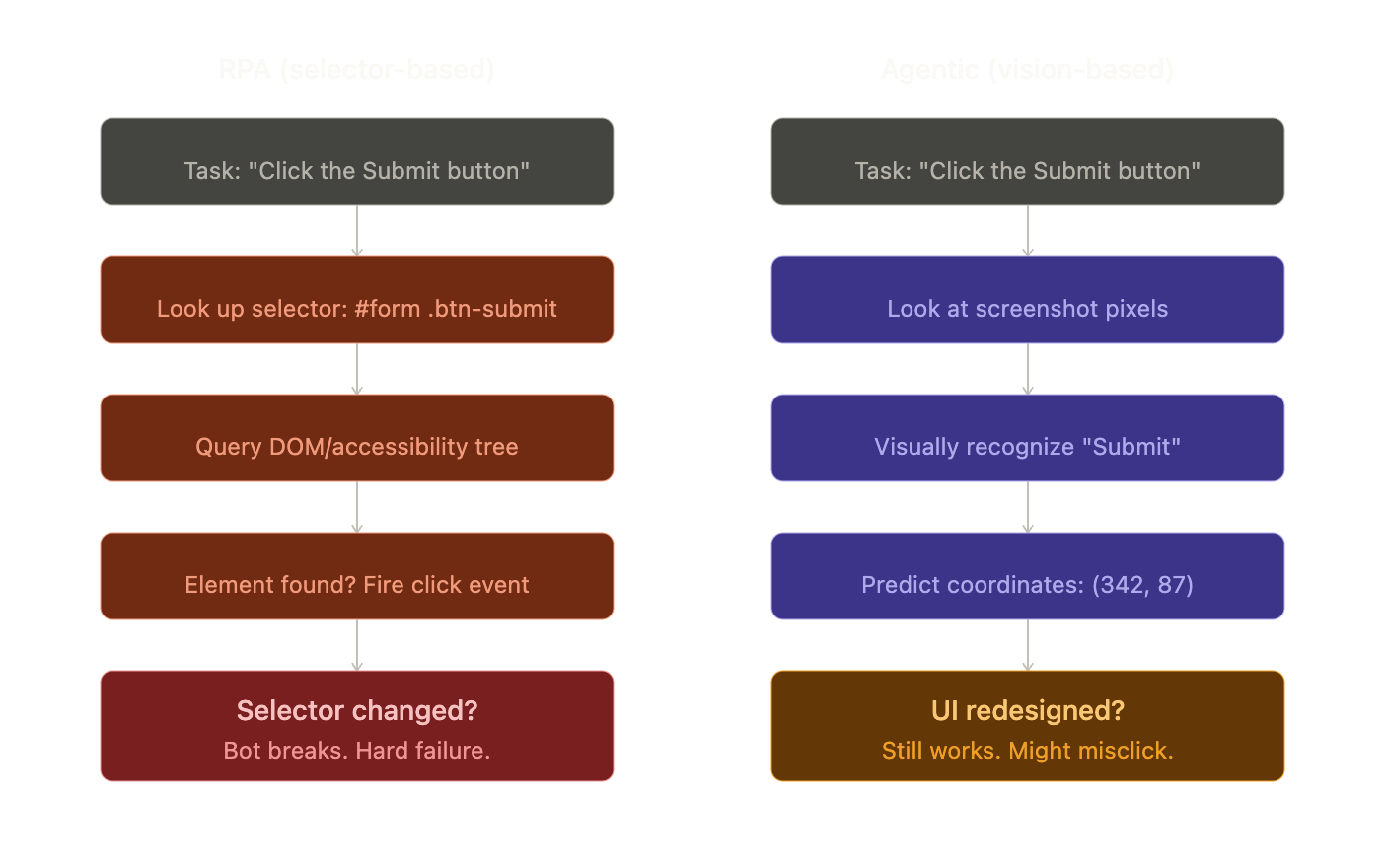 Agentic computer use replaces selectors with vision. The model recognizes the button visually, the way you would. That makes it app-agnostic and resilient to UI changes, but it comes with three structural costs:
It's probabilistic. A click aimed at (342, 87) might land at (345, 90). Fine for a big button. On a 12x12 icon in a dense toolbar, that's the difference between "Settings" and "Delete."
It's slow. Each step takes 1 to 5 seconds of model inference plus screenshot overhead. A 20-step task takes minutes. RPA does it in under a second.
It's attackable. Any text on screen enters the model's reasoning. An attacker can put invisible instructions on a webpage and steer the model's behavior. That's prompt injection, and it's a real problem.
These aren't bugs to fix. They're the physics of the approach.
How we got here
Three research threads, developed independently, crashed into each other around 2024.
Thread 1: Teaching LLMs to browse. Starting with OpenAI's WebGPT in late 2021, researchers showed you could fine-tune a language model to navigate a browser through discrete actions (search, click, scroll). The model watched thousands of human demonstrations and learned to imitate them, a technique called behavior cloning. The limitation was obvious: it worked on text-based browser views, not actual visual interfaces.
Thread 2: Think, then act. The ReAct paper (Yao et al., 2022) figured out that if you let a model interleave reasoning with actions (think about what to do, do it, observe the result, think again), both the reasoning and the acting got better. Every modern agent framework implements some version of this loop: think, act, observe, repeat.
Thread 3: Looking at pixels. This was the hard one. In late 2023, CogAgent showed that a vision-language model could match HTML-based approaches on GUI tasks using only screenshots. No page structure needed. It used a clever trick: process the screen at two zoom levels simultaneously. A low-resolution view (224x224) for "where are the major UI regions?" and a high-resolution view (1120x1120) for "what does that tiny icon say?" This dual-encoder approach cracked the cost problem, since processing a full-res screenshot in one shot was way too expensive.
In April 2024, the OSWorld benchmark pulled all three threads together: real VMs, real desktop apps, 369 tasks with automated grading. Humans scored 72%. The best AI scored 12%. The gap was huge, but now everyone could see exactly where agents failed: cross-app workflows, small icon clicks, error recovery, and vague instructions like "make it look professional."
Six months later, Anthropic shipped the first commercial computer-use API. Score: 14.9% on OSWorld, roughly 2x the prior best. Modest, but any developer could now send screenshots and get structured actions back without building their own model. The race was on. By early 2025, OpenAI, ByteDance, Google, and others had all shipped competing systems.
How the models get trained
This is where it gets interesting. The training pipeline for a frontier GUI agent in 2026 has four stages, and the last two are where the magic happens.
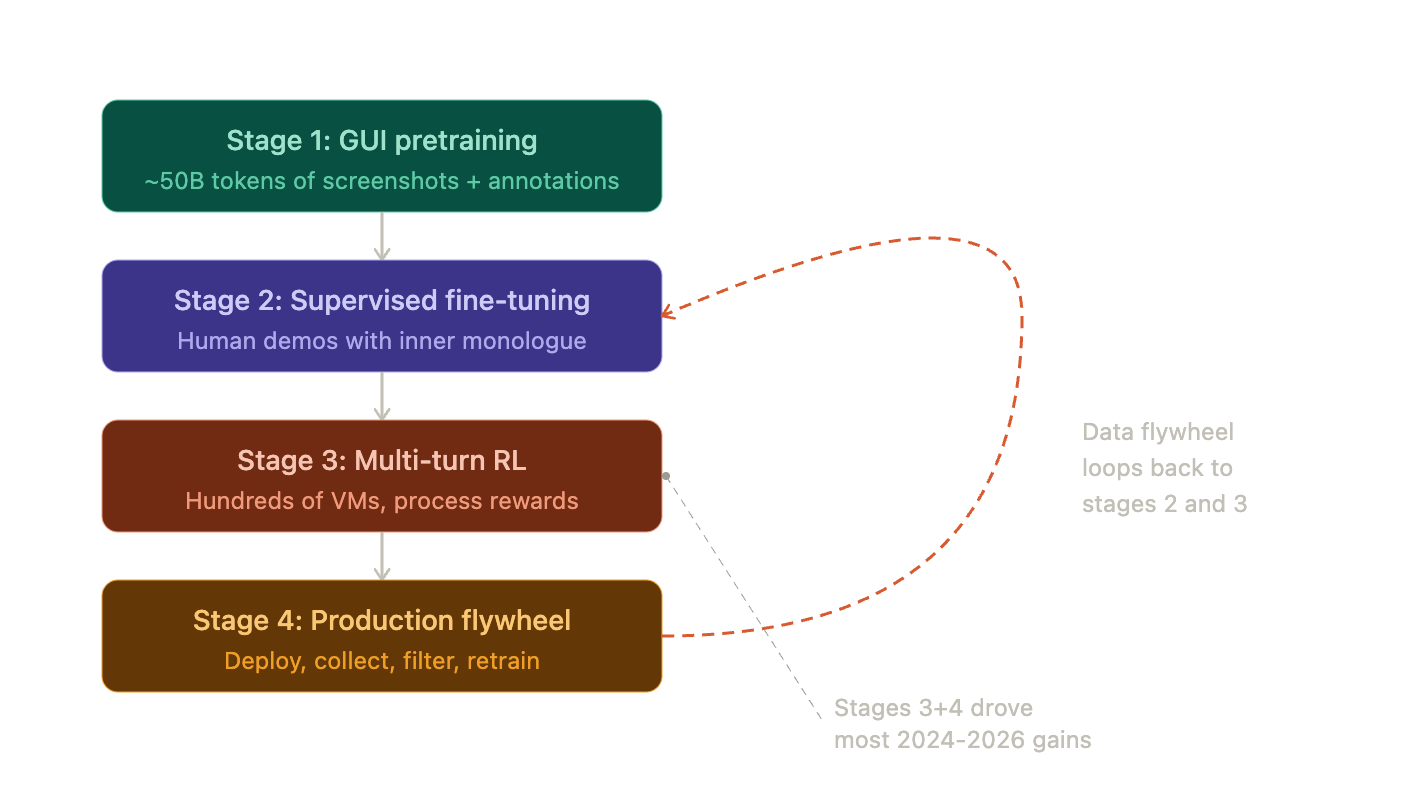 Stage 1 is pretraining. You feed the model billions of tokens of GUI data: annotated screenshots, UI state transitions, images where every button has a numbered label overlaid on it (called Set-of-Mark overlays). ByteDance's UI-TARS used about 50 billion tokens here.
Stage 2 is supervised fine-tuning. Human demonstrators complete GUI tasks while narrating their reasoning out loud ("I need to select this range first, then open the pivot table dialog"). The model learns to imitate both the actions and the thinking. That inner monologue turns out to be critical. Without it, the model learns what to do but not why, which kills generalization.
Stage 3 is where things shift. You deploy the model in hundreds of parallel VMs attempting diverse tasks, and you use reinforcement learning to improve it based on outcomes. Did the spreadsheet end up with the right formula? Did the file actually get created? Instead of only rewarding the final result, process reward models score intermediate steps too, giving the model much denser feedback to learn from.
Stage 4 is the flywheel. The trained model goes into production. Real user interactions generate new training data. You filter for quality, feed it back into stages 2 and 3, and retrain. Deploy, collect, filter, retrain, deploy. This continuous loop, combined with stage 3's reinforcement learning, is the single biggest driver of the performance gains we've seen. Models trained only on human demonstrations (stage 2 alone) plateau fast. They can't discover strategies humans never showed them or learn to recover from errors they've never seen.
Where this leaves us
The architecture converged: pure-vision perception at high resolution, learned coordinate grounding, ReAct-style reasoning, and multi-turn RL training with data flywheels. The constraints are baked in: probabilistic clicks, multi-second latency per step, and the ever-present risk of prompt injection through on-screen content.
Part 2 looks at what this architecture actually delivers in practice, and the gap between benchmark scores and real-world work.
Next: Part 2 — The Scoreboard and the $40 Billion Bet